One Character, Many Worlds: Watch the Film and Plan Your Own Story

Where to Watch the Original Source Lesson
If you searched for One Character, Many Worlds: Watch the Film, the referenced page is an official Higgsfield Academy lesson. Open the source lesson at Higgsfield Academy to view the material through its original platform and current access controls.
The public page places the lesson within a filmmaking course whose listed stages include script writing, asset development, scene generation and later sequence work. That public syllabus is a useful reminder that a finished film involves more than one image or prompt.
This article does not reproduce the film, use its frames or claim that MOVO created it. It also does not present an analysis of footage that was not available in the source-page review. The exercise that follows uses a different original character and independently generated illustrations.
What Should Remain Recognizable When the World Changes?
A single character traveling through several locations gives a production a clear continuity question. The environment can change dramatically while the viewer still needs to understand who is moving through the story. Decide which details carry that identity before generating the sequence.
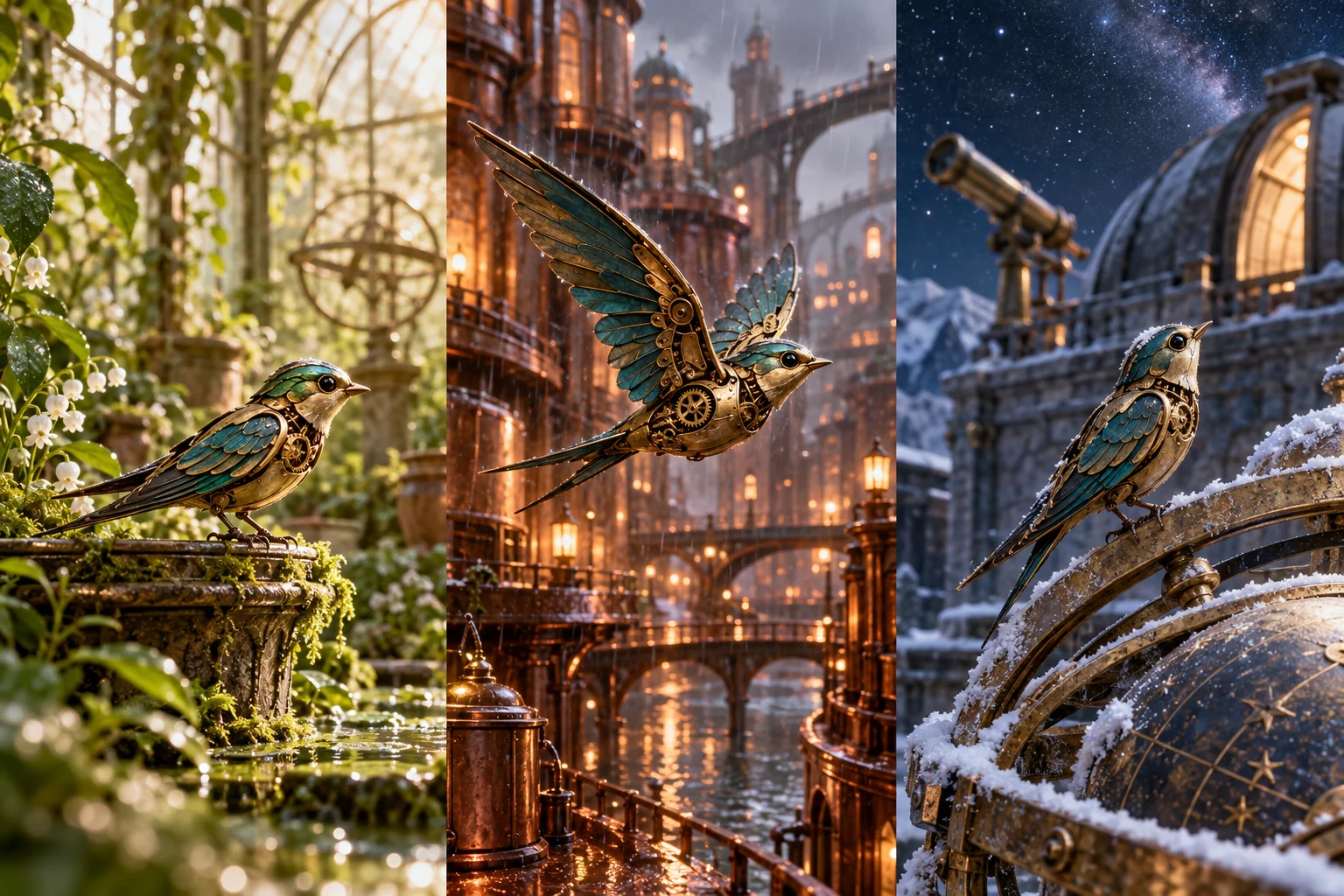
Choose a small number of defining features. For a fictional clockwork swallow, those might be a compact brass silhouette, teal wing panels and a particular tail shape. For another original character, the important details may be wardrobe, proportions or a recurring prop.
Keep those features distinct from the world's lighting and atmosphere. A snowy setting can change the color of reflected light without intentionally changing the character's design. A deliberate reference sheet helps the reviewer distinguish an environmental change from an identity drift.
Write an Original Three-World Story
Give each location a narrative role rather than treating it as another attractive background. One place can establish the character's purpose, another can introduce a challenge and the last can complete the action. A location change should add information or change the character's situation.
An original brass-and-teal clockwork swallow carries a tiny seed capsule from a mossy greenhouse. In a rainy copper city, it pauses to find a sheltered route. At a snowy observatory, it delivers the capsule to a warm growing chamber. Keep the bird's defining silhouette and materials stable while the light and surroundings change.
This is an independent planning example, not a reconstruction of the source film. Adapt the structure to your own character and goal. Write why the character moves between worlds before choosing elaborate camera movements.
Check the story without images. If the locations could be shuffled without changing anything, clarify the cause-and-effect relationship. A strong visual journey still benefits from a reason for its order.
Prepare Character, Location and Prop References
Keep a character anchor
Select an approved reference and a concise description of defining details. Keep experimental variants separate so the next shot does not accidentally use a rejected design.
Describe each location's job
Record the world, atmosphere and story information the scene needs to communicate. Make the relevant visual references specific enough to guide the production without copying an existing film's distinctive assets.
Track recurring props
If an object carries the story, define its appearance and when it is visible. A seed capsule that changes size or disappears between scenes can confuse the viewer even when the main character remains recognizable.
Explain reference roles
Tell the workspace whether an asset controls character appearance, location, mood or a prop. The MOVO reference guide describes bringing appropriate assets into the creative workflow.
Test One Scene Before Expanding the Journey
Start with a representative scene and one readable action. Review whether the character remains recognizable, the environment supports the action and the camera makes the important information clear. Do not use a beautiful first frame as proof that the complete movement works.
If an image already establishes the visual direction, use the image-to-video workflow with a restrained motion request. If the scene still needs to be developed from the script, use text to video. Select from the models actually available in the workspace.
Record the result and the reason for any revision. If the identity drifts, focus the next attempt on that problem. If the scene's purpose is unclear, return to the story plan instead of only adding more visual detail.
Review Continuity Across Cuts and Locations
Place the scenes in story order and watch them together. Check character details, the recurring object and the direction of the action. The viewer should understand both that the world has changed and that the story is continuing.
Inspect transitions from one lighting environment to another. Decide which changes are intentional and which make the character feel redesigned. Review the shots at the intended viewing size, including the small details that matter to the narrative.
Listen to the complete sequence if it includes audio. Do not assume generated sound, dialogue or music automatically matches across independently created shots. Use appropriate finishing controls for exact audio and timing work.
Develop Your Own Finished Sequence With MOVO AI
Use the MOVO video maker workflow to keep the script, references and scene reviews connected. Confirm the creative direction before generating unnecessary alternatives and retain approved material as the project develops.
Budget the unresolved work rather than assuming a reference image completes the production. The credits guide offers a way to estimate assets, shot attempts and revisions using current workspace information.
Watch the final sequence as a viewer who has not read the planning notes. Confirm the character's goal, the role of each location and the ending. The source lesson can be viewed on its original platform; your own project should stand on an original story, appropriate assets and a deliberate review process.
Frequently Asked Questions
Where can I watch the referenced film lesson?
Use the official Higgsfield Academy lesson link in the first section. Current playback and access conditions belong to that platform.
Is the source film a MOVO production?
This article does not make that claim. The referenced lesson belongs to Higgsfield Academy, while the MOVO planning exercise and illustrations here are independent.
Are the pictures taken from the source film?
No. The clockwork-swallow illustration is an original asset for this article, not a film frame, remake or benchmark.
How do I keep a character recognizable across different worlds?
Define a focused set of appearance details, retain approved references and review the character, props and movement across the complete sequence. Exact preservation is not guaranteed.
Should I generate every world before reviewing the character?
Start with a representative scene so you can resolve important identity or motion issues before expanding the sequence.
What should each location contribute?
Give it a story role, such as establishing a purpose, introducing a challenge or resolving the action. A location change should do more than replace the background.