How to Make AI Videos with an AI Video Agent

Creating an AI video used to mean switching between multiple tools for scripts, images, video generation, editing, voiceovers, music, and more. An AI video agent changes that by connecting more of the creation process in one workflow.
If you're learning how to make AI videos, MOVO AI takes a different approach from traditional one-shot video generators.
Instead of asking you to generate individual clips and assemble everything manually, MOVO AI works as an AI video agent that guides the creation process from your initial idea to a more complete video project.
The workflow can be broken into five steps.
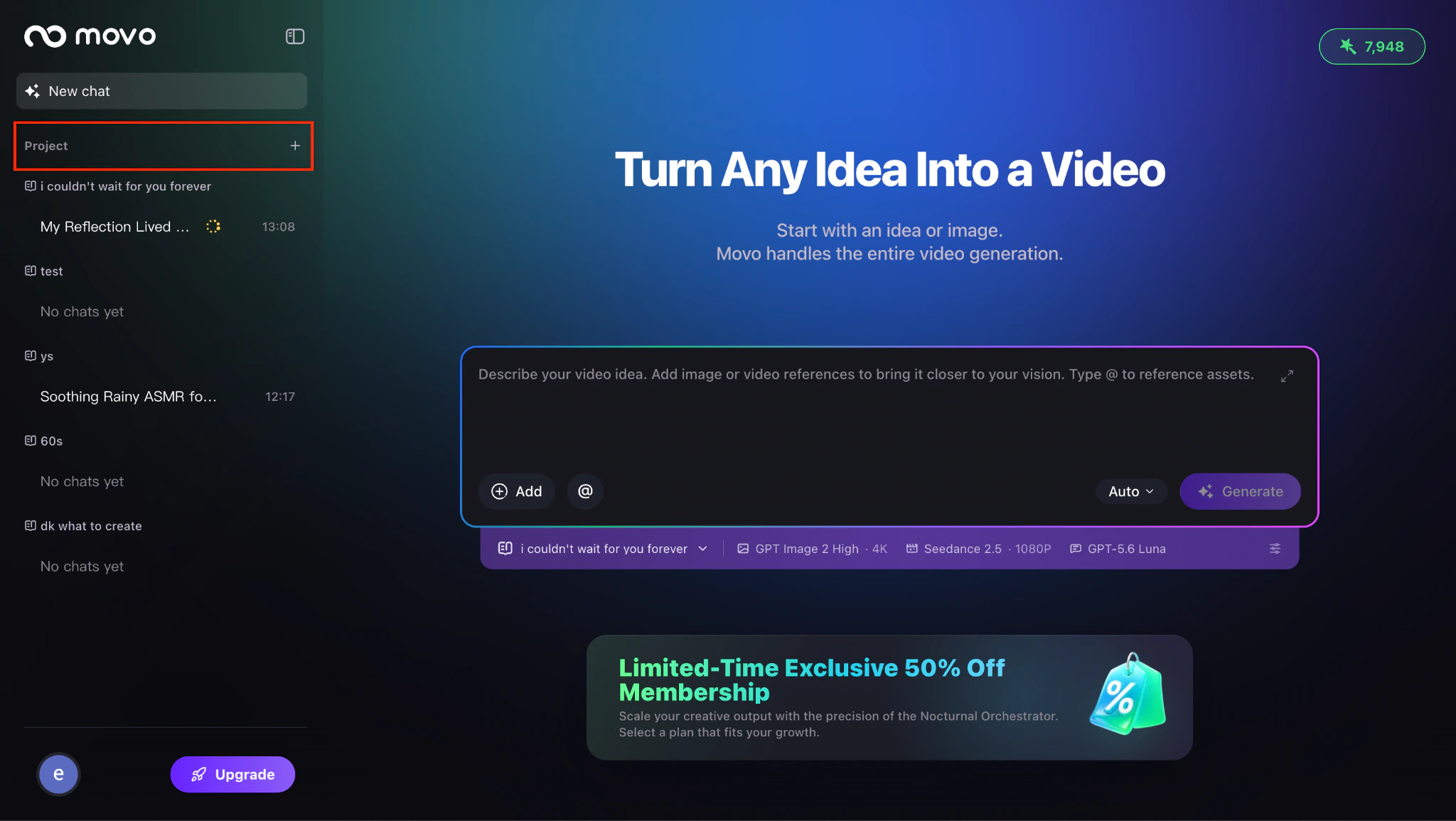
Step 1: Create a Project and Set Up Your Video
Start by signing in to MOVO AI and creating a new Project.
Before you begin describing your video, MOVO lets you choose the model configuration and operating mode that best fit your production needs. This gives the AI video agent context for how you want the project to be created.
Once your Project is ready, you can move from setup into the actual creative process.
For anyone learning how to make an AI video, this project-based workflow is useful because the video is treated as an ongoing production rather than a single generation request.
Step 2: Describe Your Vision and Add References
Next, tell MOVO AI what you want to create.
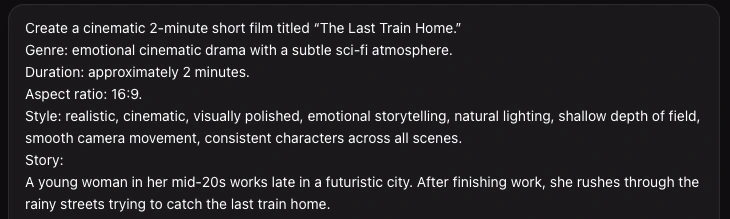
You can describe your creative vision in natural language and upload reference assets to give the agent more context. MOVO then proposes a creation direction based on your brief.
Your prompt can include details such as:
- The topic or story
- Visual style
- Characters
- Mood and tone
- Target audience
- Desired video length
- Reference images or other assets
- Important scenes or creative ideas
For example:
Create a cinematic travel story about a solo traveler exploring Tokyo at night, with neon streets, quiet cafés, train stations, and an emotional visual style.
If you're learning how to create a video using AI, this is where giving the agent more context becomes especially valuable.
And if your goal is how to make realistic AI videos, references and specific visual direction can help establish a clearer creative target before generation begins.
Step 3: Review the Creative Direction and Video Script
This is one of the most important differences between MOVO AI and a conventional AI video generator.
MOVO does not simply take your prompt and immediately return an isolated clip.
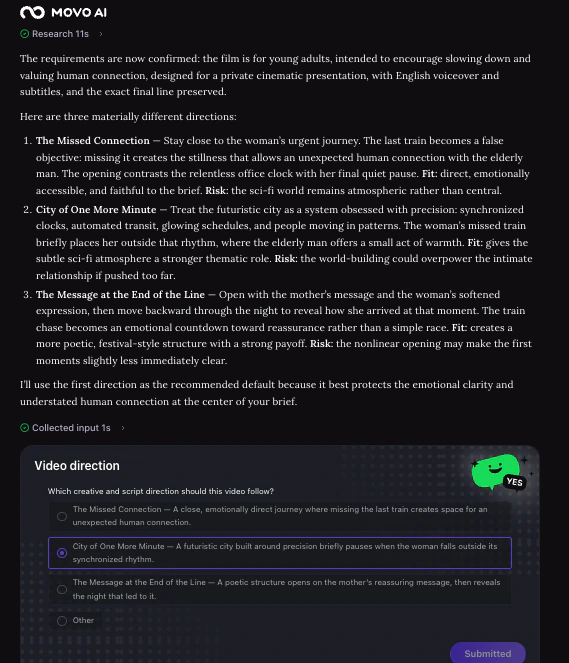
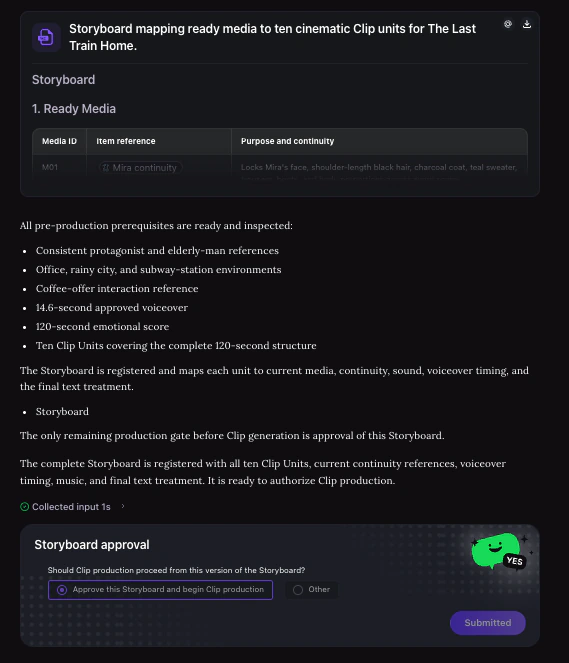
Before generation begins, you can review the proposed creation direction and then review the video script.
That gives you an opportunity to check whether the agent has correctly understood:
- The overall story
- Video structure
- Scene progression
- Creative direction
- Key content
- Narrative flow
This matters especially when figuring out how to make long AI videos.
A longer video needs more than visually impressive individual shots. It needs a structure that connects those shots into a coherent sequence.
MOVO AI is designed around this broader workflow: the official User Guide describes it as an AI video agent that can turn ideas, references, and uploaded assets into complete video stories of 120+ seconds, rather than functioning as a one-shot clip generator.
Step 4: Generate, Review, and Track Your Video
Once you're happy with the direction and script, MOVO moves into generation.
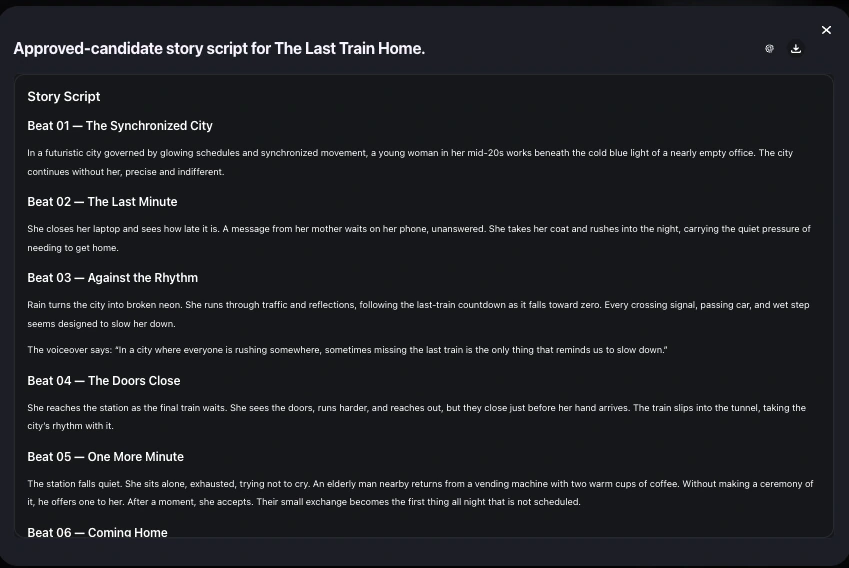
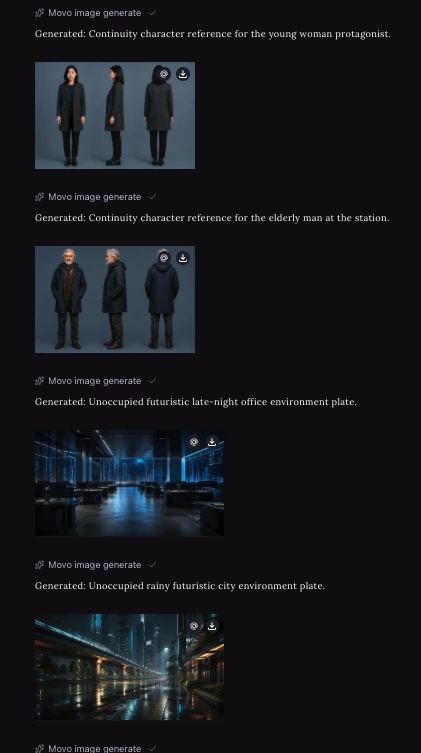
For tasks that consume credits, you'll first see an approval step. You can then review generated assets and follow live shot rendering through the To-do list as the project progresses.
MOVO also lets you follow the agent's thinking process during the workflow, so you can see how the project is progressing instead of waiting for a black-box generation to finish.
As assets and shots are generated, review them as parts of the complete video rather than judging each shot in isolation.
Look for:
- Visual consistency
- Character continuity
- Scene-to-scene flow
- Pacing
- Unnatural movement
- Overall storytelling
This is an important part of learning how to make AI generated videos that feel like complete content instead of a collection of unrelated clips.
Step 5: Manage, Continue, or Extend Your Project
Your workflow doesn't necessarily end after the first video is generated.
MOVO AI lets you browse session assets, track credit usage, manage Projects, continue the workflow, or build a sequel from an existing project.
That makes the Project itself a reusable creative workspace rather than a one-time generation.
For creators working on series, stories, campaigns, or longer-form content, this can make the process of creating videos with AI much easier to organize.
A scene can look great by itself and still feel wrong when placed inside a longer video.
Once your scenes are ready, review the content as a complete sequence.
Ask:
- Does the opening immediately establish the idea?
- Do the scenes connect logically?
- Is the pacing consistent?
- Does the visual style stay coherent?
- Are there obvious AI artifacts?
- Does the ending feel complete?
This is an important step if you're learning how to make long AI videos.
Longer AI videos are not simply about generating longer clips. They require continuity between scenes, consistent visual direction, and an overall structure.
An agent-based workflow can help shift the focus from individual generations to the video as a whole.
How to Make Text to Video with AI
To make text to video with AI start by describing the video you want to create in natural language. Include the subject, setting, visual style, actions, camera movement, and any important details you want the final video to include.
With an AI video agent like MOVO AI, you can turn your idea into a structured video project instead of manually building every scene from scratch. The agent helps interpret your request, organize the creative direction, and generate the video based on your instructions.
How to Make Image to Video with AI
To make image to video with AI, upload an image and describe how you want it to move. You can specify character actions, camera movement, scene changes, atmosphere, or other motion details.
MOVO AI uses the image as a visual reference while the AI video agent helps turn your instructions into a more complete video workflow. This makes it easier to animate a still image while keeping the original subject and visual direction consistent.
How to Make Realistic AI Videos
Creating realistic AI videos isn't only about writing more detailed prompts. Consistency across scenes is just as important.
Describe subject movement, camera behavior, lighting, environment, and visual style clearly. For multi-scene projects, make sure important details such as characters, locations, and overall visual direction remain consistent throughout the video.
MOVO AI uses project memory to maintain context within your creative project, helping keep characters, assets, and visual styles consistent across scenes. This makes it easier to create AI videos that feel more coherent instead of looking like a collection of unrelated clips.
If you're learning how to make realistic AI videos, think beyond the quality of a single shot. The goal is to maintain believable movement, visual continuity, and a consistent creative direction across the entire video.
How to Make Long AI Videos
If you're learning how to make long AI videos, avoid treating the project as one long generation.
Instead, break the video into smaller scenes or sections and plan the overall structure before generation. Longer videos require consistency in characters, assets, visual style, pacing, and narrative flow across multiple scenes.
This is where an AI video agent can be especially useful.
MOVO AI uses project memory to maintain context throughout a creative project, helping the agent keep track of important characters, assets, and visual direction as the video develops.
Rather than generating disconnected clips one by one, you can work within a connected project and focus on building a more complete video story.
How to Make AI Videos for Free
If you're wondering how to make AI videos for free, MOVO AI gives new users 100 free credits to explore the AI video creation workflow. These credits do not expire, so you can use them when you're ready rather than rushing to spend them within a trial period.
With your free credits, you can explore how an AI video agent works across the creative process—from describing your idea and adding references to generating, reviewing, and refining video content.
MOVO AI is designed for conversational creation, so you don't need to start with complex prompts. You can describe what you want naturally, upload your own images, videos, or references, and let the agent help turn those inputs into a more structured video project.
If you're learning how to create AI video for free, this gives you a practical way to experience an agent-led workflow before deciding whether you need additional credits or a paid plan.
Different generations consume different amounts of credits depending on factors such as the AI model, video duration, resolution, output type, and generation complexity.
What Types of AI Videos Can You Create?
Once you understand how to create a video using AI, an AI video agent can support a wide range of creative formats. With MOVO AI, you can turn ideas, references, and assets into complete video projects across five main categories.
Stories & Series
Create narrative videos with connected scenes, recurring characters, and a consistent visual style.
For creators learning how to make long AI videos, Stories & Series are especially useful because they require continuity across multiple scenes rather than isolated clips.
MOVO AI's project-based workflow helps keep the story, characters, assets, and creative direction connected throughout the production process.
Short Films
Turn a simple concept into a structured short film with a clear beginning, development, and ending.
An AI video agent can help organize the creative direction, script, scene progression, and generation process, making it easier to move from an initial idea to a more complete cinematic video.
Short films are also a good format for experimenting with storytelling, visual style, camera language, and realistic AI-generated scenes.
Animation
Create animated videos from ideas, images, characters, or visual references.
You can use AI to develop animated scenes for storytelling, branded content, stylized concepts, or experimental creative projects.
For more consistent results, clear references and visual direction can help maintain the same characters and style across multiple scenes.
Social
Create AI videos for platforms such as TikTok, Instagram Reels, YouTube Shorts, X, and other social channels.
You can experiment with:
- Short-form storytelling
- Creative hooks
- Trend-inspired concepts
- Product content
- Lifestyle videos
- Vertical video formats
If you're learning how to make AI videos, social content is a practical way to test different ideas, styles, and creative directions quickly.
Ads
Create AI advertising videos for products, brands, campaigns, and marketing concepts.
MOVO AI can help turn a product idea or creative brief into a more structured video workflow, allowing marketers to explore different concepts without manually coordinating every stage of production.
AI-generated ads can be used to test:
- Product storytelling
- Promotional concepts
- Creative directions
- Different visual styles
- Campaign variations
Tips for Creating Better AI Videos with MOVO AI
Knowing how to make AI videos is only the beginning. With an AI video agent, better results often come from giving the agent clear creative context and working with it throughout the production process.
Start with a Clear Creative Goal
Instead of trying to write a highly technical prompt, begin by explaining what you want to create in natural language.
Include useful context such as:
- The purpose of the video
- Target audience
- Story or message
- Visual style
- Mood and tone
- Desired length
- Important characters or products
For example:
Create a 30-second emotional travel ad for social media, following a solo traveler exploring Tokyo at night with a cinematic and intimate visual style.
MOVO AI can use this broader creative goal to help develop the direction of the project rather than treating it as a single generation request.
Add References When They Matter
If you already have images, videos, characters, products, or visual references, add them to the project.
References give the AI video agent more context about the look and direction you want to achieve.
This can be especially useful when learning how to make realistic AI videos, because the agent can work from clearer visual information instead of relying only on text descriptions.
Review the Creative Direction Before Generation
Don't rush straight into generation.
MOVO AI gives you the opportunity to review the proposed creative direction and video script before production begins.
Check whether the agent has correctly understood:
- Your story
- Scene structure
- Key characters or products
- Visual direction
- Narrative flow
- Important creative requirements
Making adjustments at this stage can be much more efficient than correcting every scene after generation.
Use Project Context for Consistency
Consistency becomes increasingly important when you're creating multi-scene or longer videos.
MOVO AI uses project memory to maintain context across the creative process, helping keep characters, assets, scenes, and visual styles connected throughout the project.
This is especially valuable if you're figuring out how to make long AI videos, where continuity matters more than the quality of any single clip.
Refine Through Conversation
AI video creation is still an iterative process, but refinement doesn't have to mean rewriting complex prompts from scratch.
If something doesn't look or feel right, tell MOVO AI what you want to change.
For example:
Make the pacing slower and more cinematic.
Keep the same character appearance in the next scene.
Make the lighting warmer and more natural.
Continue the story with the same visual style.
Working through natural conversation makes the process closer to collaborating with a creative partner than operating a traditional generation tool.
Learning how to make an AI video doesn't have to mean managing every generation, scene, and creative decision separately.
MOVO AI is built around the AI video agent approach, helping creators move from an initial idea toward a more structured video creation workflow. It is an autonomous AI video agent designed to operate as your entire production crew. Powered by a smart cognitive engine, our platform lets you transform simple URLs or images into studio-grade video ads, automatically handling everything from scriptwriting to final rendering.
Whether you're creating social content, advertisements, animated videos, stories, or longer-form projects, the goal is to spend less time managing individual tools and more time developing the video itself.
Frequently Asked Questions
How do I make an AI video?
To make an AI video with MOVO AI, start by creating a project and describing your video idea in natural language. You can also upload images, videos, or other references. MOVO AI then helps develop the creative direction and video structure. After reviewing the direction and script, you can generate the video, track its progress, review the results, and continue refining the project.
How can I make AI videos for free?
If you're wondering how to make AI videos for free, new MOVO AI users receive 100 free credits to explore the AI video creation workflow. These credits do not expire. You can use them to experience the process from describing your idea and reviewing the creative direction to generating and refining your video. Credit usage varies depending on factors such as the model, video length, resolution, and generation complexity.
How do I make realistic AI videos?
To make realistic AI videos, describe movement, camera behavior, lighting, environment, and visual style in detail.
For multi-scene projects, consistency is equally important. MOVO AI uses project context to help maintain continuity across characters, assets, and visual direction, making it easier to create a more coherent video.
How can I make long AI videos?
Instead of trying to generate one long clip, break the video into scenes or sections and plan the overall story before generation. An AI video agent can help manage this process by keeping the project structure and context connected across multiple scenes. MOVO AI is designed around a project-based workflow, making it easier to develop longer, more complete video stories.