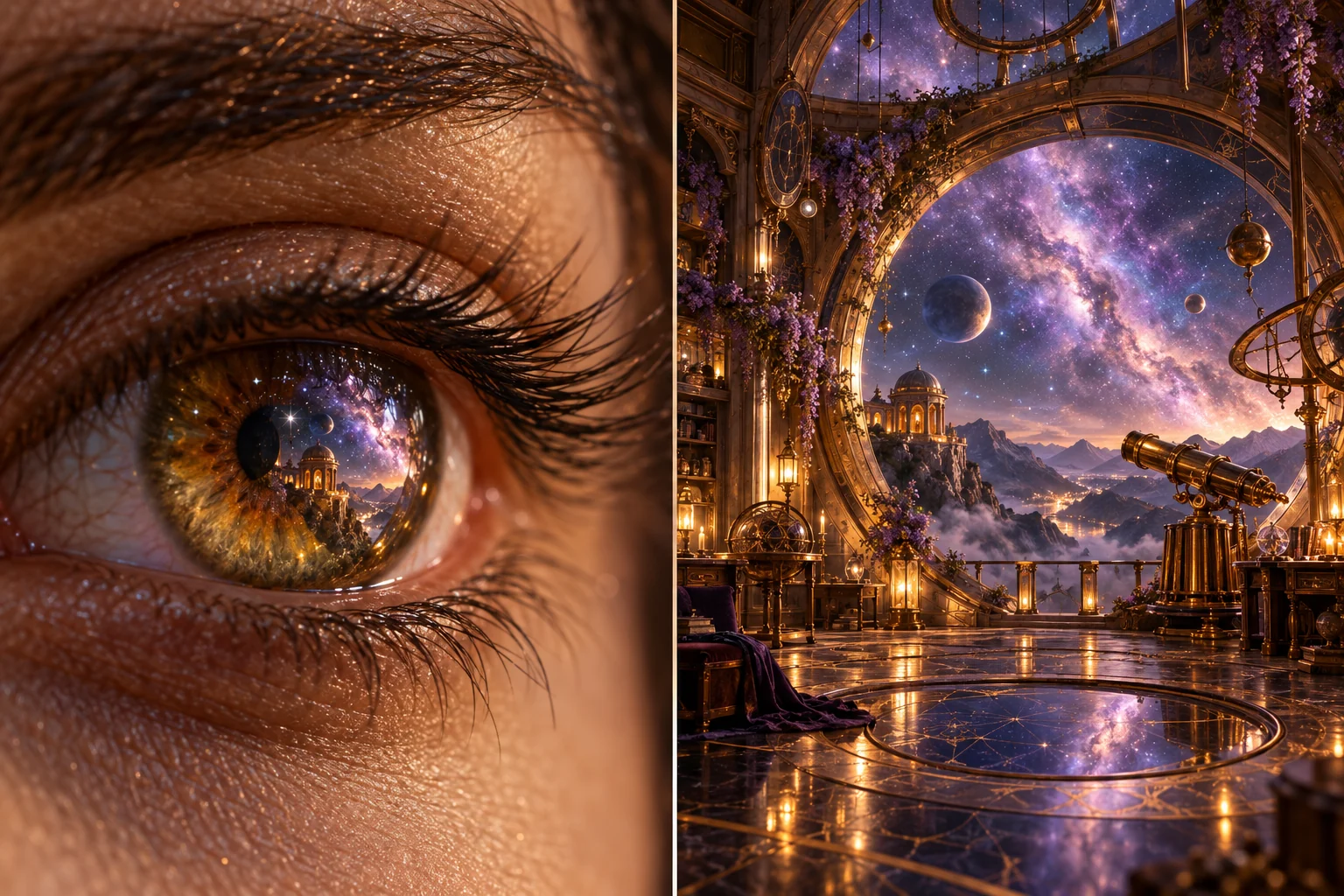
What Is an Eyes In Transition?
An Eyes In effect uses an eye as a visual doorway into another scene. The camera movement suggests that the viewer is entering a memory, imagined world or subjective experience. Its story value comes from the relationship between the person and the destination.
Higgsfield's Eyes In example page describes an external effect that moves through a subject's pupil into a new scene. That preset belongs to its own workflow; this MOVO page does not install or reproduce that specific effect automatically.
Use the entry above to plan an original surreal sequence. Decide what the transition reveals and how the destination changes the viewer's understanding. A dramatic move is more meaningful when it advances the story rather than serving as an unrelated flourish.
Give the Destination a Narrative Purpose
Choose what lies beyond the eye before generating the opening portrait. A fictional astronomer might imagine an observatory floating among lavender stars. That destination can express curiosity or a remembered place without representing a real person's private experience as fact.
Write a short connection between the subject and the revealed world. The eye reflection, a color or a recurring object can foreshadow the destination. Keep the connection simple enough that it survives the motion and the final viewing size.
Avoid crowding the reveal with too many unrelated settings. One coherent destination gives the audience time to understand the transition. If the sequence needs a second change, establish why it follows rather than treating every cut as another surprise.
Plan the Opening Gaze and Composition
Use an original fictional subject or an appropriately authorized reference. Choose the eye, gaze direction and level of facial detail deliberately. A readable starting frame helps the viewer understand where the camera is moving.
Consider whether an extreme close-up suits the project. It can feel intimate or intense even without disturbing imagery. Match the scale and speed to the intended audience and keep the mood consistent with the destination.
Inspect important features throughout the approach. Reflections, eyelids and surrounding skin should not distract from the intended movement. A clean starting image does not guarantee that the eye remains stable during a generated camera move.
Connect the Two Scenes Visually
Select a shared visual anchor such as amber light, a circular doorway or a lavender star field. That anchor can help the reveal feel related to the opening even when the images are created as separate shots. It is a creative planning choice rather than a guarantee of seamless transformation.
Describe the intended camera direction and destination framing in plain language. Avoid asking for several contradictory movements at once. A focused approach and clear reveal are easier to evaluate than an uncontrolled combination of zoom, spin and scene changes.
Use suitable compositing and editing controls if the exact passage through the pupil matters. Match timing, framing and transitions in the finishing stage. Do not assume a prompt will preserve every facial feature or produce an exact single-take effect.
Test the Difficult Transition Before Expanding
Start with a short representative attempt containing both the approach and the reveal. Review the complete motion rather than accepting the destination frame alone. Look for abrupt shape changes, unclear direction or a moment that feels like an accidental cut.
If one part works, keep it and revise the unresolved part deliberately. You may need a separate destination shot or a simpler camera path. Retain the approved frames and notes so revisions do not unnecessarily redesign the whole visual world.
The eye-and-observatory illustration on this page is original conceptual artwork. It shows the intended relationship between scenes, not a rendered transition benchmark or a frame from a competitor's example.
Use MOVO for the Original Scene Direction
Explain the fictional subject, intended emotion and destination in MOVO. Use approved reference material where appropriate and review identity, environment and motion across the full result. Keep exact effect execution distinct from general scene generation.
Finish precise transition timing, captions and sound with appropriate controls. Sound can help bridge the reveal, but it should not conceal an incomprehensible picture change. Watch the sequence without audio as another clarity check.
Inspect the saved export at the intended display size. Keep the beginning and end readable, retain useful source assets and ensure the scene supports the larger story rather than overwhelming it.
Frequently Asked Questions
Does MOVO include the Higgsfield Eyes In preset?
No such integration is established here. The entry develops an original scene brief.
What does the effect communicate?
It can suggest a fictional memory, imagination or subjective reveal when the destination has a clear story purpose.
Do I need to generate it in one shot?
Not necessarily. Separate scenes and suitable compositing may give better control over exact timing.
What connects the opening and reveal?
A deliberate shared color, shape, object or lighting motif can make the relationship clearer.
Is the illustration a completed transition?
No. It is original conceptual artwork linking two scene ideas.
What should I review?
The full approach and reveal, including eye stability, camera direction and destination readability.