AI Face and Character Swap in Video and Photos: A Practical Guide

Choose Face Replacement, Character Replacement or an Original Scene
An AI face and character swap guide for video and photos should begin by defining the intended change. Replacing a facial identity is different from changing a whole character's wardrobe, body design and performance. Creating an original scene from approved references is a third task.
Write what should change and what should remain. A portrait concept might retain pose and clothing while evaluating a different approved face. A fictional character redesign might deliberately change the outfit and silhouette. Those results need different acceptance criteria.
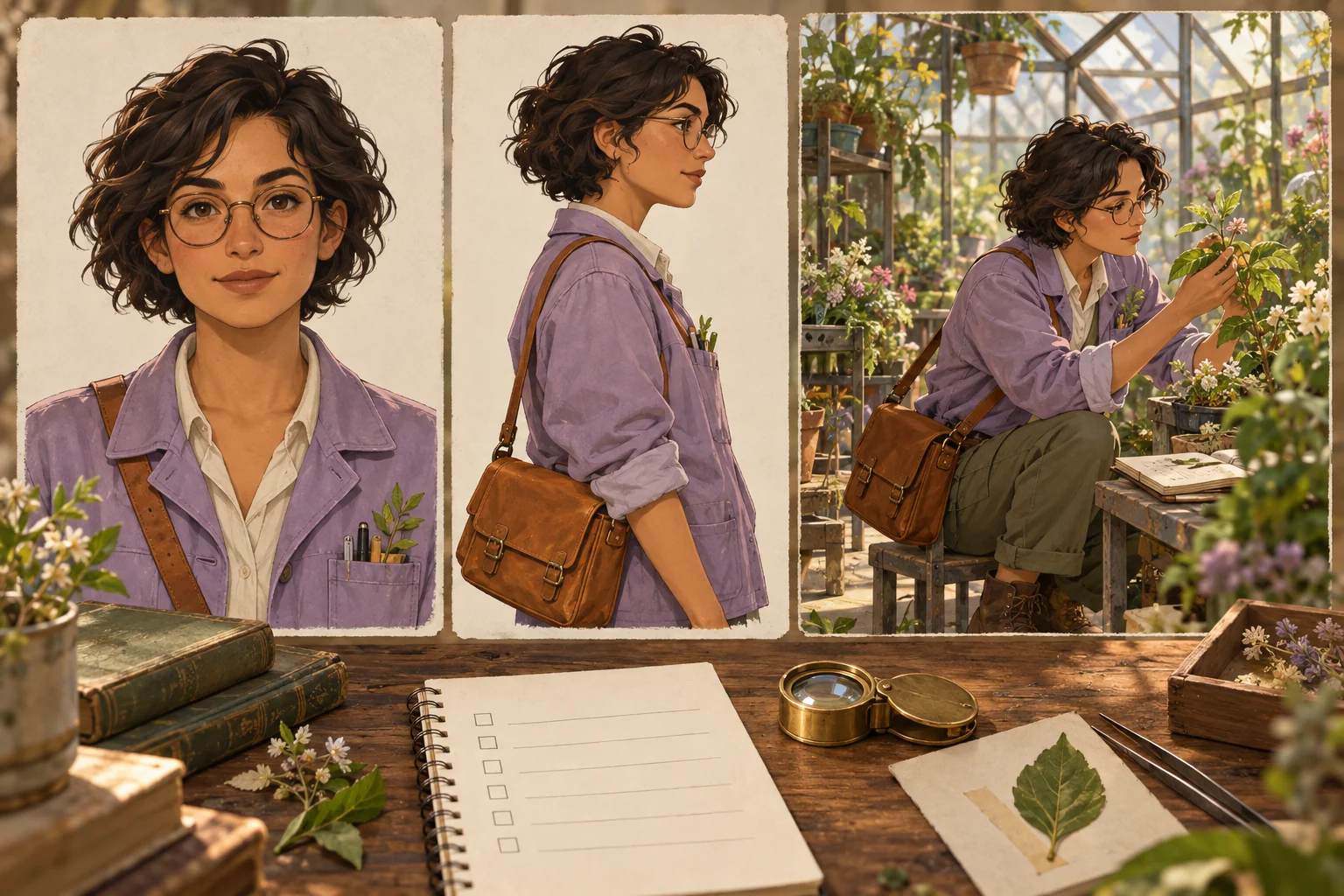
This guide uses an independently authored fictional botanist with short dark hair, round glasses, a lavender jacket and an amber satchel. It does not reconstruct the unavailable supplied competitor article, reproduce a real person's likeness or promise a dedicated MOVO swap engine.
Prepare Approved Source and Target Material
Use your own material or references you are authorized to use for the intended production. Keep the approved scope with the project. A portrait used to discuss lighting should not silently become an instruction to fabricate a new identity or endorsement.
Label the source identity, target scene and any separate character-design reference. For the botanist, a neutral portrait can establish appearance while a greenhouse image supplies the setting. Keep these roles explicit instead of expecting every attached image to control every aspect of the result.
Retain unchanged originals and a small set of accepted references. If several images disagree about hair, glasses or costume, resolve the design choice before expanding the sequence. More references do not automatically make the intended character clearer.
Use a Photo Test to Inspect Appearance and Context
Choose a target view containing the important challenge: an angled head, glasses, unusual light or a hand near the face. A simple front-facing portrait can be a useful baseline, but it does not test every condition the project will encounter.
Inspect expression, gaze, proportions and the relationship between face and surrounding head. Check boundaries around ears, hair and eyewear. A recognizable identity can still look misplaced if the lighting or expression no longer suits the scene.
Review context as well as resemblance. The fictional botanist should still appear engaged with the plant or action the composition establishes. A technically neat portrait that changes the emotional meaning may not be the right creative result.
Add Temporal Review for Video
A successful still does not establish a successful moving shot. Video introduces changing angles, occlusion, expressions and motion blur. Select a representative passage containing the difficult action rather than testing only a stationary opening.
Watch at normal speed first, then inspect transitions and difficult frames. Look for identity drift, flickering boundaries, glasses that change shape or an expression that jumps between moments. Review the beginning and ending as carefully as the middle.
For the botanist exercise, a turn from the plant toward the greenhouse door tests profile and motion together. A hand adjusting the satchel adds an occlusion challenge. These are proposed test conditions, not claims that a particular model has passed them.
Keep Full-Character Continuity Broader Than the Face
Track the design elements the story needs: clothing, silhouette, prop state, posture and scale relative to the environment. Replacing a face alone does not ensure that the satchel stays on the same side or that an object remains in the correct hand.
Create a short continuity note for the accepted scene. Identify the important jacket, glasses and satchel details and where they can change intentionally. Do not demand identical incidental foliage in every shot when the story only requires a coherent greenhouse setting.
Compare neighboring shots in sequence. Travel direction and prop transitions can fail between two individually attractive clips. A complete character-led scene should communicate a readable action, not only repeat a similar portrait.
Use Dedicated Swap Tools Within Their Actual Scope
Higgsfield's face swap page describes an external target-and-source workflow for photos and video. Review its current media support, reference requirements and export conditions directly. The product description is not evidence that MOVO offers the same operation.
Test the specific requirement in the selected tool and inspect the saved result. Do not transfer broad preservation or speed claims into a guarantee for your difficult shot. This guide did not run a hands-on swap benchmark, verify an account plan or measure an engine's performance.
Keep photo editing, video identity replacement and new character generation clearly labeled in production notes. That distinction makes it easier to choose the next step when one stage succeeds but another remains unresolved.
Build an Original Character Scene in MOVO
If the story needs a fictional character rather than a real-person identity replacement, describe the original design directly in MOVO. Provide appropriate approved references and explain the character's role, goal and visible action.
An original brief could ask the botanist to carry an amber satchel along a greenhouse aisle, pause beside a new leaf and turn toward the window in soft morning light. Keep the first test focused enough to review identity, prop and action together.
Inspect the full generated clip and revise the observed problem deliberately. MOVO's role here is original scene and story development; exact likeness preservation, automatic face replacement, full-character swapping and synchronization with an external identity tool are not established by this guide.
Finish and Review the Complete Production
Use suitable finishing controls for exact captions, dialogue, cuts and graphics. Keep the presentation consistent with the approved creative purpose. If an imagined scene could be mistaken for a factual depiction, provide the appropriate context in the final work.
Watch the saved export at its destination size and compare it with the accepted references. Check expression, costume, prop state, sound and the ending together. A small preview should not be used to hide an unresolved issue the audience will notice.
Retain the approved source material, reference roles, test notes and final assets. The botanist reference-sheet illustration on this page is original conceptual artwork, not a product screenshot or measured identity-preservation result. Clear records make later character revisions easier to review.
Frequently Asked Questions
Is face replacement the same as a full-character swap?
No. A full-character change can involve clothing, silhouette, body design and performance beyond the face.
Does MOVO provide the dedicated swap operation in this guide?
No such integration is established. Use a suitable specialist tool for identity replacement and MOVO for original scene development.
Can a successful photo test prove video continuity?
No. Review changing angles, motion, expressions and occlusion across the complete video shot.
What should I label in the references?
The approved identity source, target scene and separate character-design or setting roles.
What matters besides facial similarity?
Expression, light, clothing, props, action, context and continuity between shots.
Are the botanist images benchmark results?
No. They are independently generated conceptual reference artwork, not a measured swap test.